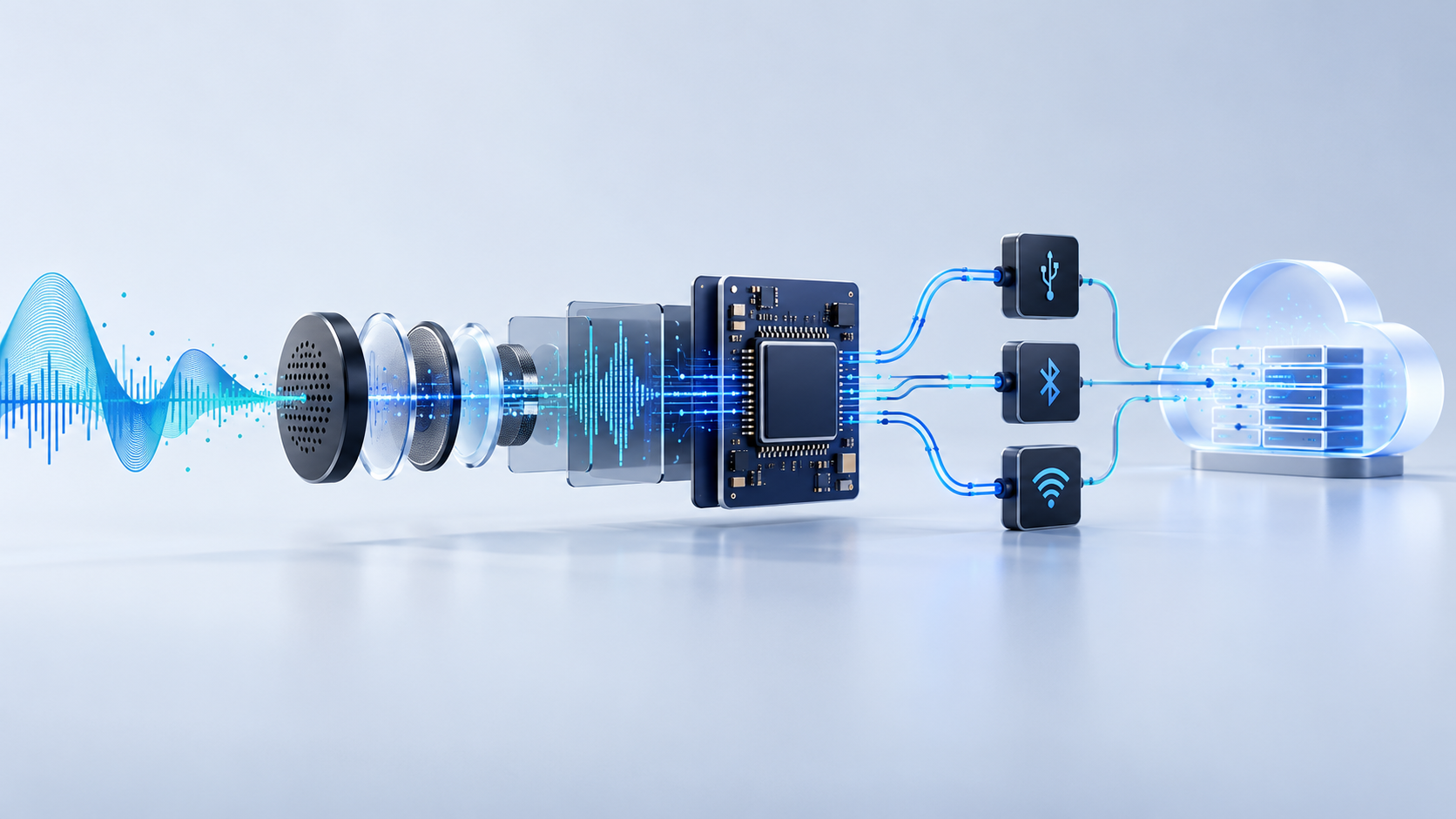
A production-ready voice-first AI hardware setup is not simply a microphone connected to a language model. It is a coordinated system for capturing speech, conditioning the signal, moving or storing audio, controlling device behavior, and handing reliable data to an AI platform.
For most product teams, the stack includes seven layers: acoustic capture, audio processing, embedded compute, local storage or streaming, connectivity, firmware, and an SDK or API path into the application. The right design depends on the workflow. A wearable recorder, a meeting-room endpoint, and a desktop transcription microphone should not use the same architecture by default.
This guide explains how to define that architecture without locking the project into the wrong microphone, processor, radio, or cloud workflow too early.
What Does a Voice-First AI Hardware Setup Include?
A useful reference path is:
Voice → Microphone → Audio front end/DSP → MCU or SoC → Storage or stream → USB, BLE or Wi-Fi → SDK/API → Customer AI platform
Hardware usually owns capture, preprocessing, device control, buffering, and transport. The customer application may own speech recognition, language models, data retention, and business logic. That boundary must be written down for each project. It determines processor selection, memory, battery capacity, firmware scope, security controls, and test criteria.
Start With the Workflow, Not the Microphone
The most expensive architecture mistakes often begin with a component decision made before the use case is defined. A microphone with an impressive datasheet may still perform poorly when it is placed behind the wrong acoustic opening, mounted on moving clothing, exposed to fan noise, or expected to capture several speakers across a room.
Who is speaking, and at what distance?
- One person speaking close to a wearable device
- A doctor and patient moving around a consultation room
- Several participants around a meeting table
- A field technician working near tools, vehicles, wind, or machinery
- A user addressing a hands-free device from across a room
What must happen after capture?
- Stream audio with low delay
- Store a recording locally and upload it later
- Send audio through a companion phone application
- Appear as a USB microphone to a computer
- Upload directly to a customer-controlled cloud or private server
These questions should be answered before the team freezes the processor, radio, memory, and battery architecture. Teams planning a broader program can use GMIC’s AI hardware development process to connect these requirements to prototype, EVT, DVT, and PVT decisions.
Layer 1: Microphone and Acoustic Design
The microphone is the beginning of the data pipeline, but microphone count alone does not determine capture quality. Engineers must consider target distance, directionality, signal-to-noise ratio, acoustic overload point, sensitivity consistency, placement, enclosure openings, wind exposure, vibration, and the expected noise field.
A single microphone can be appropriate for close-talk capture. Multiple microphones can support spatial processing, beamforming, or noise reduction, but only when array geometry, synchronization, enclosure design, and DSP are developed together. The microphone array and beamforming guide explains those trade-offs in more detail.
Acoustic validation should use representative housings and real speaking distances. A development board tested on an open bench does not reproduce the resonances, occlusion, handling noise, or speaker feedback paths of the final product.
Layer 2: Audio Front End and DSP
The audio front end converts microphone signals into usable digital audio. Depending on the design, it can include microphone biasing, amplification, analog-to-digital conversion, PDM or I²S interfaces, clocking, filtering, and channel synchronization.
DSP may add voice activity detection, automatic gain control, noise suppression, beamforming, acoustic echo cancellation, or other speech-focused processing. Each function needs a clear purpose and measurable acceptance criteria. For example, acoustic echo cancellation matters when a loudspeaker plays into the same acoustic space as the microphones and a usable reference signal is available.
Processing cannot recover information that was never captured. Severe clipping, a blocked microphone port, or a badly placed enclosure opening cannot be solved by adding more software. Audio tuning should therefore be validated as part of the complete mechanical and electronic system, not as a final filter applied after industrial design is finished. See GMIC’s audio DSP tuning guide.
Layer 3: MCU, SoC or Edge AI Processor
| Product requirement | Typical compute direction |
|---|---|
| Recording control, buttons, LEDs and BLE commands | Low-power MCU |
| Multiple audio channels, Wi-Fi and more complex DSP | Higher-performance MCU or application SoC |
| Local wake word, ASR or model inference | SoC with suitable DSP, NPU or accelerator |
| Cloud-based AI with local capture and buffering | Optimize for reliable audio, storage, security and transport rather than maximum inference compute |
The processor decision should follow measured workloads. Sample rate, bit depth, channel count, codec, DSP load, encryption, radio activity, user interface, and OTA strategy all affect memory and power requirements. A chip selected only for peak AI performance can create unnecessary cost and battery pressure if inference remains in the cloud.
Layer 4: Local Storage or Real-Time Streaming?
Local recording is useful when connectivity is intermittent, low power matters, or the workflow can tolerate delayed processing. Real-time streaming is useful for live assistants, captions, alerts, or immediate workflow automation. Many commercial devices use a hybrid architecture: they stream when possible while maintaining a local buffer or recording that protects the session during a network interruption.
The architecture should define how interrupted transfers resume, how duplicate uploads are prevented, how timestamps and device identity are preserved, when local data can be deleted, and whether an authorized user can export a recording. These behaviors are more important than simply adding memory. GMIC’s offline voice AI hardware guide and local recording versus streaming comparison cover the decision in depth.
Layer 5: USB vs BLE vs Wi-Fi
| Interface | Best fit | Strength | Design constraint |
|---|---|---|---|
| USB Audio | Desktop, meeting-room and development systems | Stable wired audio path; can combine data and power | Cable limits mobility; host compatibility still requires validation |
| BLE | Wearables, control, provisioning and phone-bridged workflows | Low-power control and short-range connectivity | Do not assume a basic BLE data link is suitable for continuous raw audio |
| Bluetooth LE Audio | Products whose chipsets, hosts and operating systems support the LE Audio stack | LC3 enables product-level trade-offs among bitrate, quality and power | Protocol, codec, driver and host support must be confirmed end to end |
| Wi-Fi | Direct upload, larger files and higher-throughput streaming | Higher throughput and direct network connectivity | Higher power, provisioning, credentials and network reliability |
| Hybrid | Commercial AI endpoints | BLE for setup/control, Wi-Fi for transfer, USB for service or host audio | More firmware states, coexistence testing and recovery logic |
The USB Implementers Forum defines Audio Device Class specifications for devices that manipulate audio, voice, and sound-related functions. This provides a standards-based route for compatible USB audio products, although the selected class version and host behavior still need verification. USB-IF maintains the current Audio Device Class materials.
Bluetooth LE and Bluetooth LE Audio should not be treated as interchangeable terms. LE Audio introduces the LC3 codec and an audio architecture designed to give developers choices among quality, bitrate, and power consumption. Actual battery life and latency depend on implementation, radio conditions, buffers, retransmission policy, processing, and the host. The Bluetooth SIG LE Audio FAQ and its technical guide to LC3 latency and QoS are appropriate primary references.
Layer 6: Firmware Responsibilities
- Recording and streaming state machines
- Button, LED, sound and haptic behavior
- Power states and battery protection
- File creation, indexing and local storage rules
- Pairing, provisioning, authentication and device identity
- Upload, retry, resume and duplicate prevention
- OTA update and rollback behavior
- Error reporting, diagnostics and factory test modes
Firmware is not a finishing layer added after the electronics are complete. It defines how the product behaves when networks disappear, storage fills, batteries fall below a safe threshold, users press controls in an unexpected sequence, or an update is interrupted. Those scenarios belong in the product requirements and validation plan. Learn more about firmware integration for AI devices.
Layer 7: SDK, API and the Customer AI Platform
The integration contract should specify who starts and stops capture, whether audio arrives as files or a live stream, the format and metadata, how devices authenticate, which operating systems the SDK supports, where data is sent, and who owns device management and OTA operations.
The hardware does not need to replace the customer’s existing ASR, LLM, or workflow platform. A well-defined voice-device SDK integration can hand audio and device events into the customer’s application while leaving intelligence, storage policies, and business logic under customer control.
Three Reference Architectures
Wearable voice capture device
Microphone → DSP → low-power MCU → local storage → BLE companion app → customer cloud
This can suit a battery-constrained device when a phone is already part of the workflow. Teams must define transfer duration, phone background behavior, pairing recovery, and what happens when the app is unavailable.
Wi-Fi meeting or room device
Microphone array → DSP/AEC → SoC → local buffer → Wi-Fi → private or cloud platform
This can support larger audio payloads or live services. Room acoustics, loudspeaker reference routing, network onboarding, enterprise credentials, and offline recovery become central design requirements.
USB transcription microphone
Microphone or array → DSP → USB Audio → desktop application → AI platform
This avoids wireless provisioning and can draw power from the host. Driver behavior, operating-system support, device controls, and audio routing should still be tested on the target host environment.
Voice-First AI Hardware Requirements Checklist
- Define the users, speakers and workflow.
- Record the target speaking distance and microphone orientation.
- Characterize noise, wind, vibration and loudspeaker playback.
- Choose local recording, streaming, or a hybrid path.
- Define audio format, sample rate, bit depth and channel count.
- Set an end-to-end latency requirement only if the workflow needs one.
- Identify the host: phone, computer, local server or cloud.
- Select USB, BLE, Wi-Fi, cellular or a combination based on the data path.
- Define network-loss and interrupted-transfer behavior.
- Set battery runtime, charging, thermal and size targets.
- Specify authentication, encryption and device identity requirements.
- Define the SDK/API commands and supported operating systems.
- Plan OTA updates, rollback and fleet diagnostics.
- Define regulatory markets and certification responsibilities.
- Turn each requirement into an EVT, DVT or PVT test criterion.
Common Setup Mistakes
- Selecting a microphone from a datasheet without validating the final enclosure.
- Treating BLE as an unlimited audio-data channel.
- Ignoring interrupted uploads, duplicate files, clock drift, or storage-full behavior.
- Waiting until after EVT to define the SDK and cloud handoff.
- Using noise reduction to hide a mechanical or acoustic design problem.
- Adding certification, factory test, security, and OTA requirements after the PCB is frozen.
Frequently Asked Questions
What hardware is needed for a voice-first AI product?
Most products need a microphone system, audio front end, embedded processor, memory or a streaming buffer, connectivity, firmware, power management, and an integration path to the AI application. The exact stack depends on the environment and workflow.
Does a voice AI device need an audio DSP?
Not every device needs a separate DSP chip. Audio processing may run in a codec, MCU, application processor, or dedicated DSP. The decision depends on channel count, algorithms, latency, power, and available compute resources.
Should a voice AI device use USB, Bluetooth or Wi-Fi?
USB is appropriate for stable wired host audio, BLE for low-power control and phone-bridged workflows, and Wi-Fi for direct network transfer or higher data throughput. Many commercial devices combine interfaces.
Can BLE stream microphone audio?
Audio feasibility depends on the Bluetooth architecture, codec, bitrate, connection parameters, chipset, host, and software stack. A basic BLE data channel and Bluetooth LE Audio are different implementations, so support must be verified end to end.
Does voice AI need on-device inference?
No. A device may perform only capture and preprocessing while cloud or private infrastructure runs speech recognition and AI. On-device inference is useful when latency, privacy, connectivity, or offline operation justifies the additional compute and power.
What should be validated before EVT is complete?
Teams should validate the core data path, acoustic feasibility, processor and memory margins, storage behavior, connectivity, power states, charging, major interfaces, and the integration assumptions that could force a PCB redesign.
Build the Setup Around the Real Workflow
A reliable voice-first AI product begins with three decisions: define the real environment, select an acoustic and connectivity architecture that fits the data flow, and validate the complete path before committing to tooling. The microphone matters, but the system around it determines whether captured speech becomes dependable input for the AI platform.
GMIC develops configurable voice AI hardware and supports audio, firmware, SDK integration, prototyping, validation, and OEM/ODM production. Product teams can start from an existing platform or define a custom architecture around their own application and backend.